TARAEXL STUDIO

The workbench for your next TARA.

Develop your analysis locally, keep related decisions connected, and prepare the result for engineering review. Studio is the starting point for one engineer or a small team.

Request a demo

FROM CONTEXT TO EVIDENCE

A dedicated place
for the whole analysis.

Work across the stages of your TARA without losing sight of the engineering context that connects them.

01 / DEFINE

System & interfaces

Describe the item, model its components and interfaces, and make the analysis boundary explicit.

02 / ANALYZE

Threats & risk

Develop assets, damage scenarios, threats and attack paths. Assess risk using the selected method.

03 / TREAT

Goals & requirements

Connect risk treatment to cybersecurity goals and requirements for the engineering handoff.

04 / REVIEW

Traceability & baselines

Inspect relationships, review decisions and preserve a baseline before sharing work products.
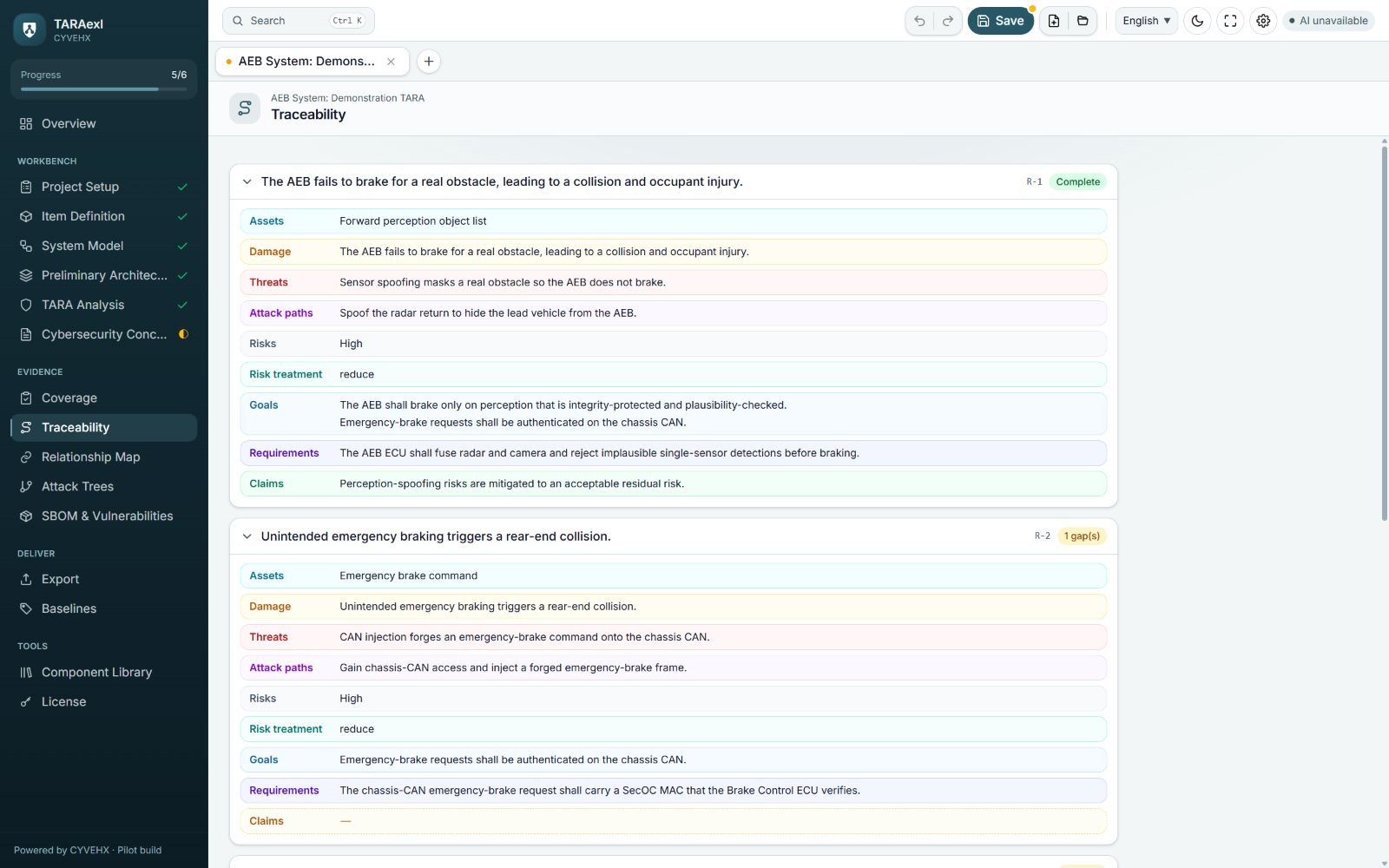
Actual Studio traceability view connecting assets, damage scenarios, threats, paths, risks, treatments, goals, requirements and claims.
Follow the links behind the analysis.Inspect original view ↗

Studio 0.1.64 browser preview · illustrative project data · AI not connected for this capture.

BEFORE YOU EVALUATE

Know what you’re
bringing into your workflow.

Request a demo version to evaluate the workflow and outputs. We’ll agree access, practical setup and evaluation scope with you.

Desktop setup
Windows x64 packaging target. Confirm the supported Windows version and recommended machine configuration for your evaluation.
Local authoring
Work on the desktop without a shared Hub server.
AI processing
Local inference or optional public API mode, depending on configuration. Public API use sends selected context externally after consent.
Example outputs
Download a DOCX report or XLSX workbook showing illustrative data. Draft/trial-labelled samples; not production assessments. Confirm other formats for your edition and workflow.
Methods
Discuss the selected assessment method and its applicability to your product. Software does not establish compliance on its own.
Commercial scope
Edition, team size, deployment and support needs are discussed before agreement. No purchase is made through this form.

SEE IT AGAINST YOUR NEEDS

Make the next conversation
about your engineering work.

Tell us your product context, team size and the outcome you need.

Request a demo
Product view
Open original ↗

Actual Studio interface · synthetic demonstration data